Woolsey - IoT
IoT (Internet of Things) System Integrators - Scroll Down for more Information
PART 1 - Digital Computer Electronics - Understanding Digital Logic and Components
(This will prepare you for Part 2 which will introduce you to the SAP-1 Computer)
By understanding Digital Electronics one can peer into the world of computers to see how they function. Below you
will see the Basic Building Blocks (Digital Electronic Gates) used to create all the various integrated circuits used to
build a computer. First you must understand the numbering system used by computers. We use the 10's or decimal
systems as humans but computers use the 2's or Binary system. Go to the Binary Numbering System selection to
learn more. Now that you understand the numbering system lets consider how Digital Electronics can perform human
things that, we perform. We think in logical terms, how can we accomplish this in electronic terms? Logic is used to simply
determining if something is true or false so how can we convert this into an electronic function? First convert true to
logic (remember Logic is the science of exact reasoning), so True then can equal Logic 1 or in electronics +5 volt (or
any level you choose). Then False would be Logic 0 equaling 0 volts (Ground). This is said to be positive logic. You
could us negative values as well.
Summary: True = Logic 1 = +5 volts ----- False = Logic 0 = 0 volts (Ground)
Now go through all the Basic Building Blocks to understand how they function. As you do you will see the above
principles applied. Lets review each of these blocks to understand how they function. First view the 'AND' to
see the functions of this Gate. You will see a Logic Simulation which will help you test your knowledge. In each
selection try to figure out the logic of each Gate by drawing a 'Logic Table' or 'Truth Table'. Then use the Simulations
to get your Answer. After studying each Gate, you will understand how each Gate works.
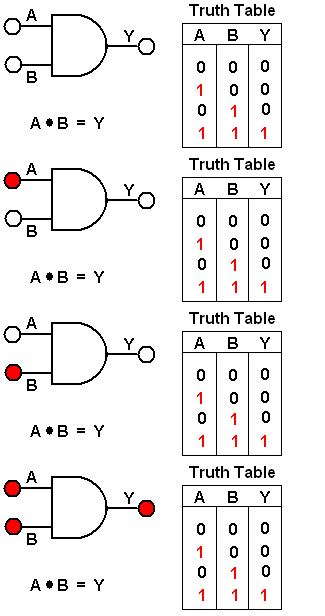
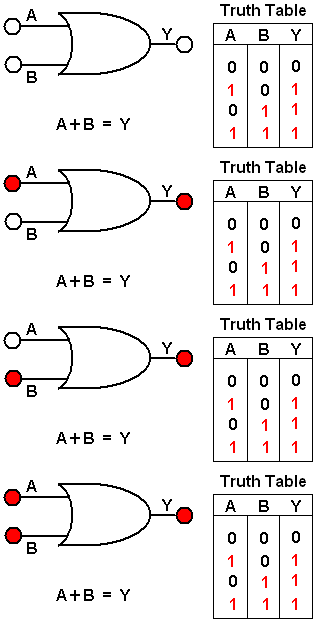
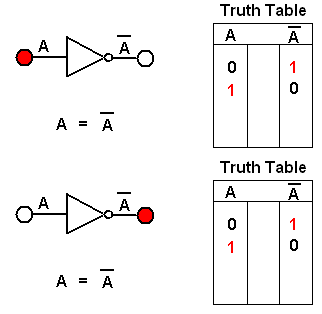
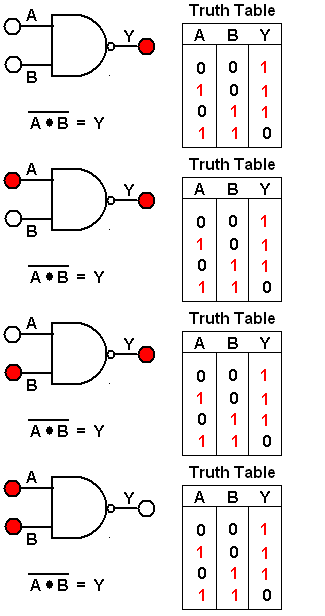
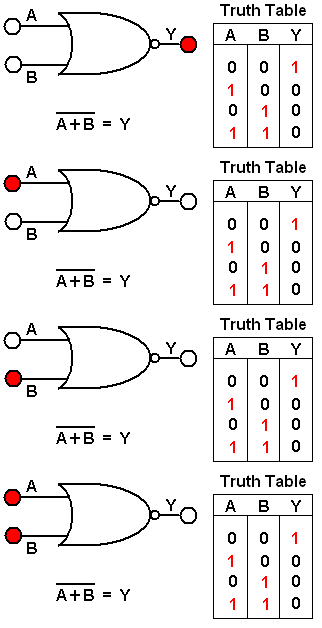
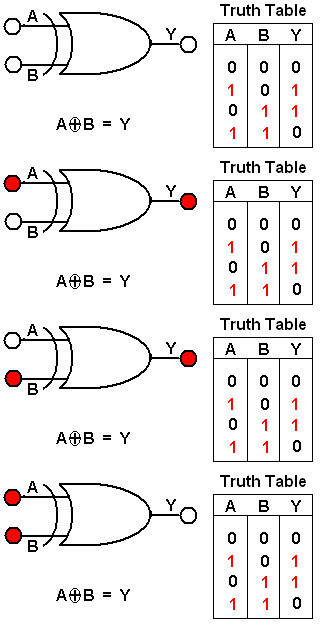
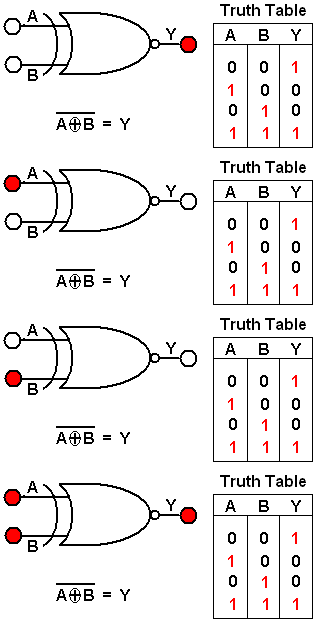
Truth Tables:
Here are the Truth Tables for all the Basic logic circuits. The first three Gates are the building blocks for all other complex integrated IC's like Flip-Flops and so on. By committing them to memory you will be able to understand all the complex
circuits that will be introduced.

Binary Numbering System
-
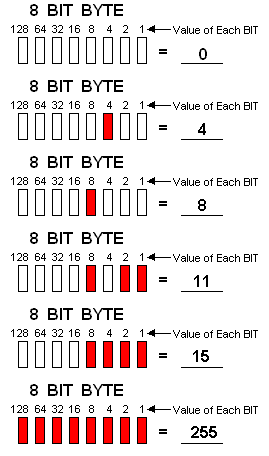
As humans we think in terms of decimal numbers but Digital Electronic devices use the Binary numbering system. So to communicate with these devices the system must be able to convert from decimal to binary. The graphic below demonstrates the conversion process.
Lets try our hand at a manual conversion.
Convert this Binary BIT configuration to a Decimal Number 01101111
The Bit at the far right is the one's position the next is the two's position and so on. This is shown in the below graphic.
So 1 + 2 + 4 + 8 + 32 + 64 = 111 right ?Most of the modern computers have larger numbering systems like 32 BIT and 64 BIT, ect. The graphic below is only a 8 BIT configuration but it does demonstrate the principles used in the conversion process.
Learning to Add, Subtract and Multiply in the Binary Numbering System
-
The graphic below shows the rules and examples on how to add, subtract and multiply Binary values. You can also test your ability with some additional Test Examples

Understanding Boolean Algebra
-
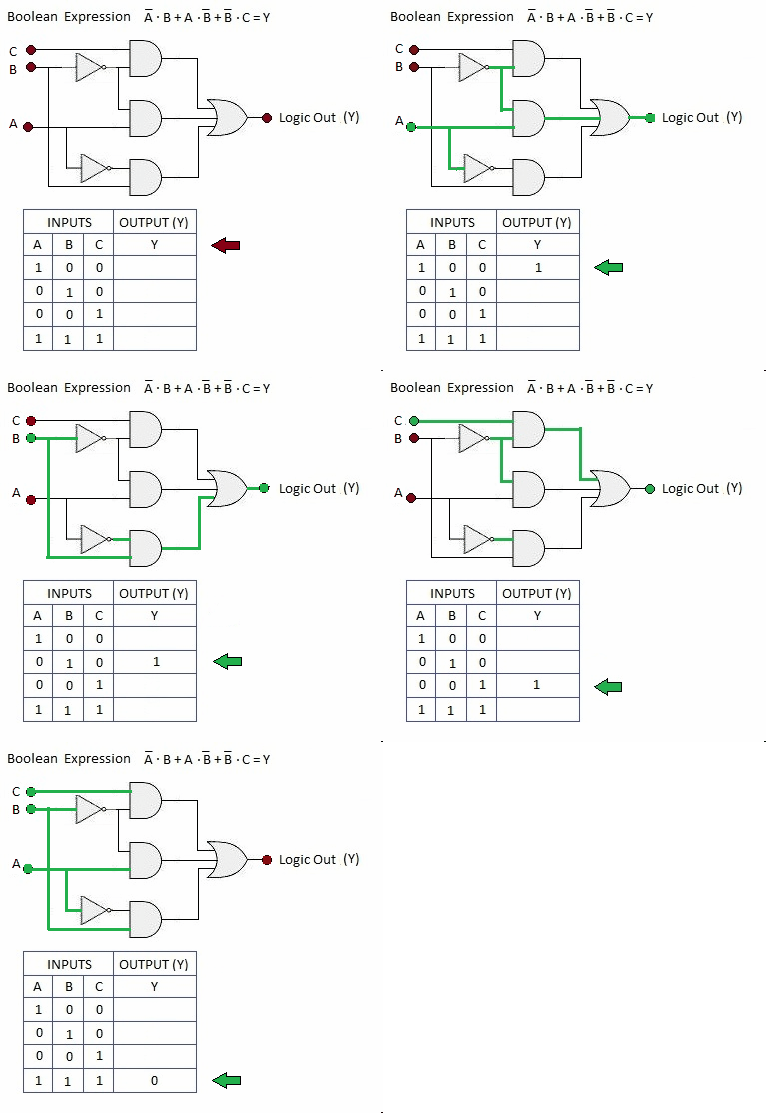
Boolean Algebra is the Math behind Digital Logic. A mathematician by the name of George Boole in 1854 developed symbolic logic, better known today as Boolean Algebra. His Algebra uses letters and symbols to represent statements and their logical connections. Later in 1938 Claude Shannon used this algebra to design telephone switching circuits. He let the variables represent closed and open relays, far different than Boole intended this math to be used for. This use has lead to todays use in many Digital Electronic applications as we will see as you advance through this App.
-
By using the graph below and the associated Boolean expression one can represent complex integrations as seen in the figure to the right. These expressions can be tested and solved by using a 'Logic Expression Calculator' (see the Tab Logical Expression Calculator for examples).

Logical Expression Calculator
-
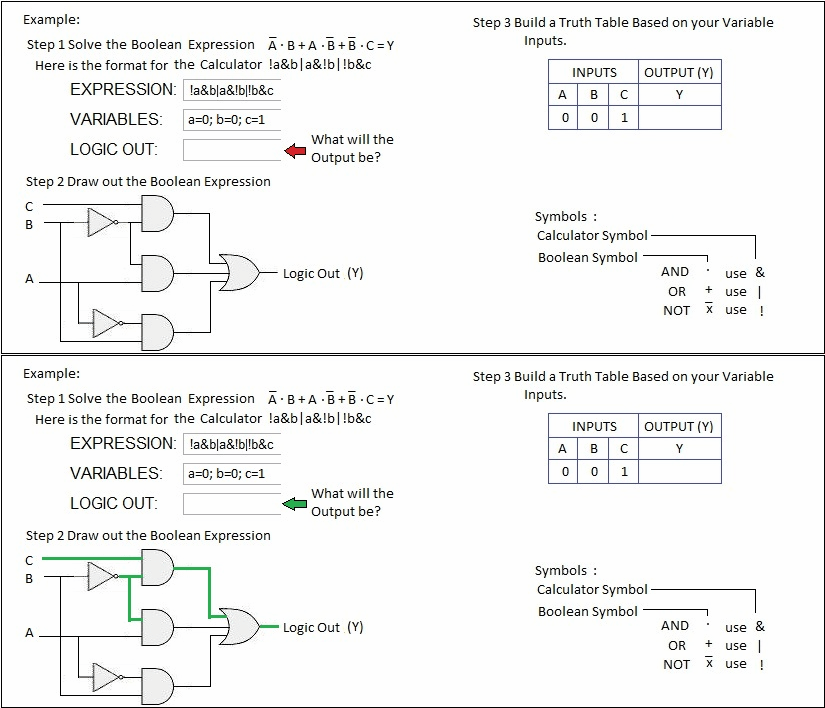
To use this calculator to solve Boolean Expressions, use the example below. You can input up to four expressions (a b c d) then input a variable value, then click Calculate. You can use this Calculator to solve the expressions on the "Understanding Boolean Algebra" Tab of this Application. You can download the App which has the Calculator in it, this only a picture of it.

Flip-Flop Circuits
Flip-Flops are part of the basic building blocks within a computer.